
 Fusebox
All your AI subscriptions.
One fast API.
A single Rust binary with OpenAI, Anthropic and Gemini compatible endpoints, backed by the accounts you already pay for. Point Claude Code, Codex, your editor or any SDK at one URL and stop caring which account answers.
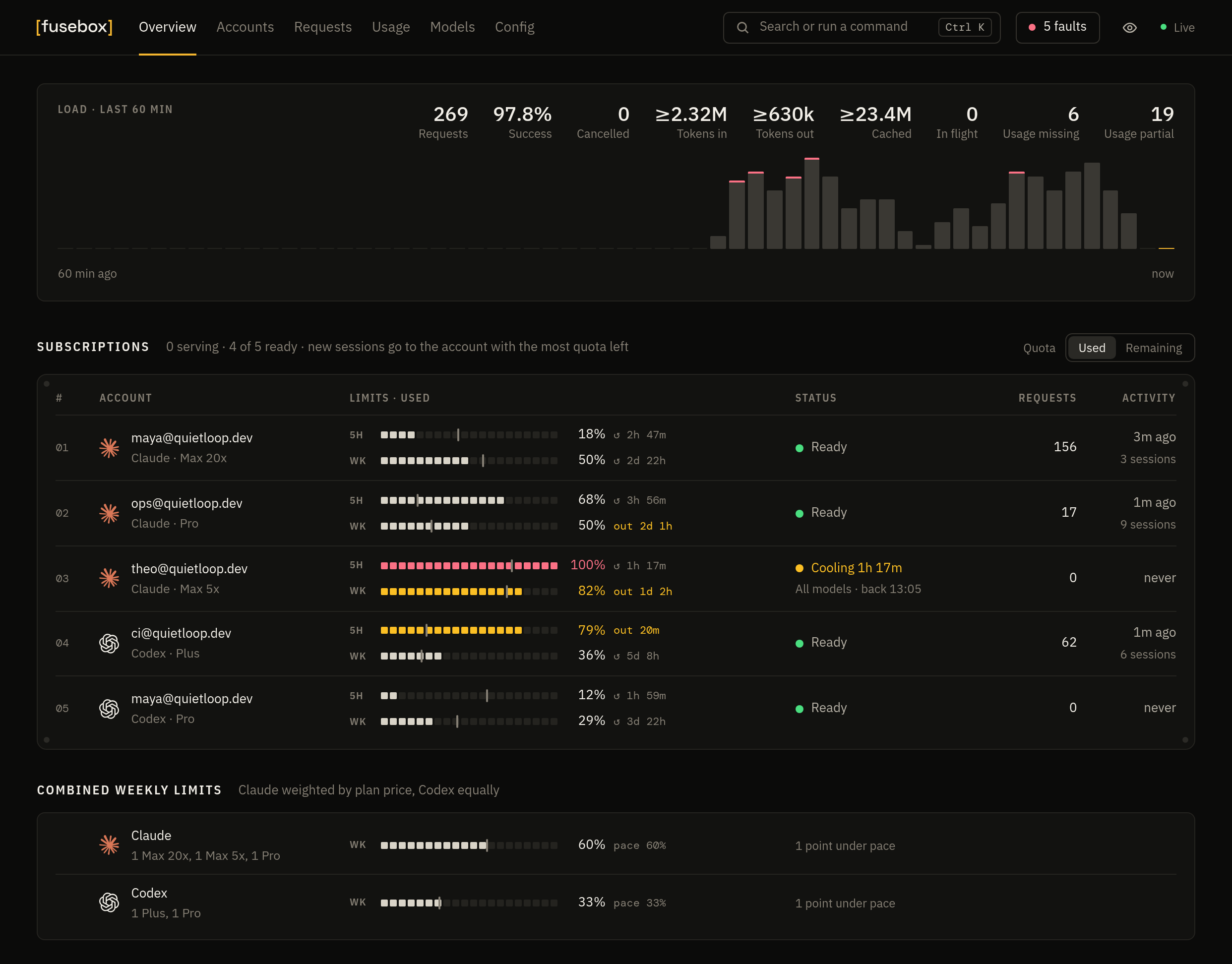
Overview · an hour of load, and every subscription's 5-hour and weekly limits with its plan
One URL for every tool.
Every account behind it.
Fusebox sits between your tools and your AI accounts. It picks an account, translates the request, retries on the next account when one fails, and streams the answer back.
One small binary
The dashboard and SQLite storage ship inside one executable. No Docker, no Node, no runtime to install.
Any model from any tool
Use GPT inside Claude Code, Claude inside Codex, or Gemini behind the OpenAI SDK. Requests are translated between formats automatically.
Many accounts, no babysitting
New sessions go to the account with the most quota left, with cooldowns, failover and OAuth tokens that refresh themselves.
A dashboard you'll open
Quota meters, a request log that explains each routing decision, and a config editor. It works on a phone too.
Is it running? Which accounts are healthy?
Where is my traffic going?
The dashboard is served from the binary at the same address as the API, with no external requests. It updates live, in dark or light, in English or Chinese.
Accounts: 5-hour and weekly quota as segmented meters, when each resets, cooldowns per model, and a breaker for each account.
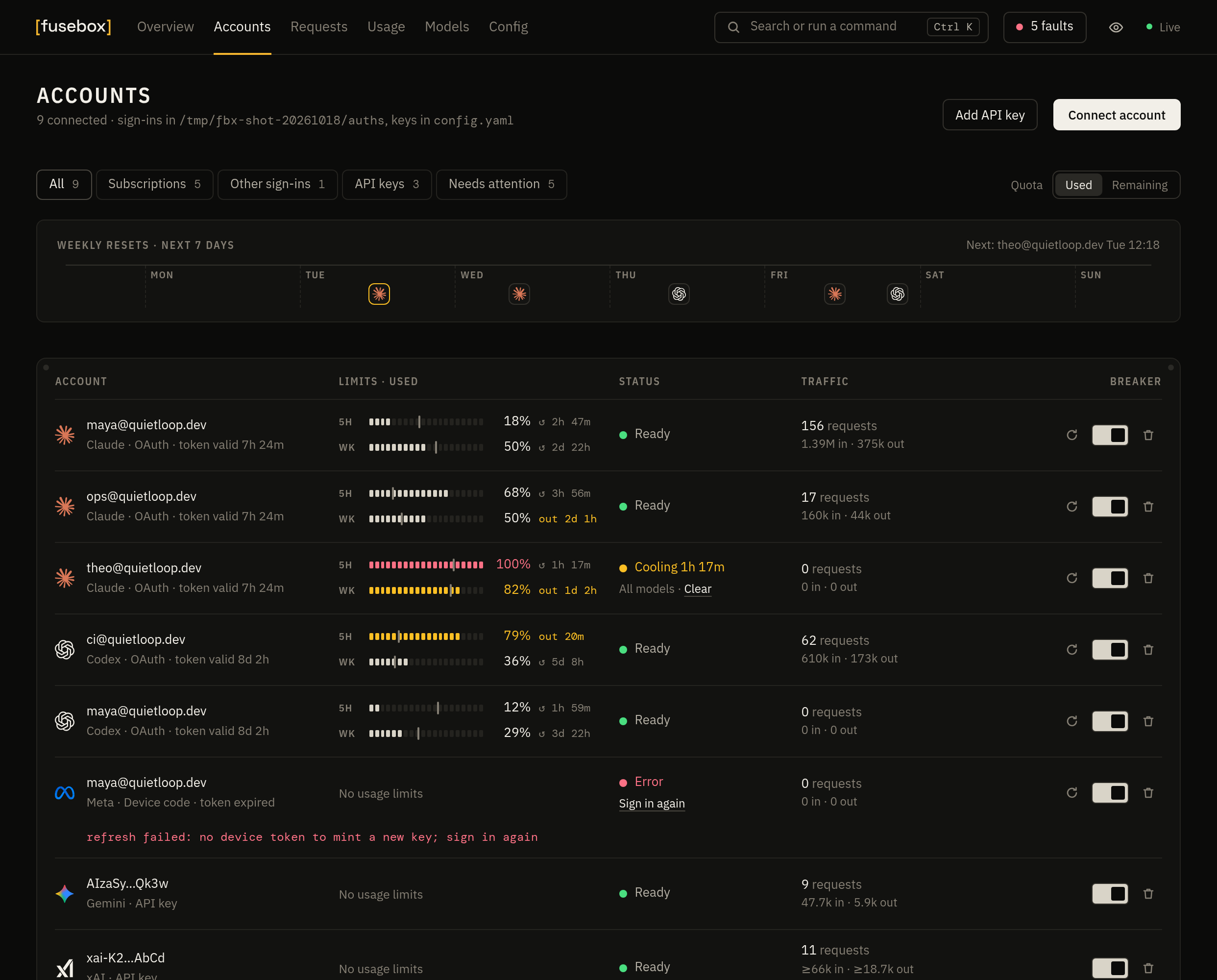
Screenshots use sample data.
Meters that show the pace
Each meter has 20 segments of 5%, a mark where usage would be if spread evenly, and a countdown to the reset.
Faults in one place
Expired sign-ins, used-up limits, rate limits and runs of failed requests, listed from one button in the top bar.
Safe to share
The eye button, or ., hides every email and API key on the page. Copy buttons still copy the real values.
Many accounts.
No babysitting.
Fusebox reads the 5-hour and weekly usage Claude and ChatGPT report, and keeps each coding session where its prompt cache pays off.
Translated, or left aloneRequests are converted between formats. When the client and the provider already speak the same one, supported native content is preserved.
Sessions stay putA coding session stays on the account it started on, and moves only when that subscription runs out of quota.
Failover, even mid-streamA rate limit cools down only that model on that account. Failed requests move to the next account, even when the error arrives inside a stream.
Model groupsGive one name to several models that take over from each other, such as Opus first and GPT when every Claude account is out.
- Claude Code
- Codex
- OpenAI SDK
- curl
- ↓ Anthropic · Responses · Chat · Gemini
- [fusebox]
parse → shared request model → build
Each format has four functions, not a translator for every pair - ↓ the account with the most quota left
- Claude
- ChatGPT
- Gemini
- Grok
- + 6 more
Point any tool
at one address.
In Config, Clients, choose a tool and a model, then copy its setup. Each machine or tool can have its own key, with its own models, request rate, daily tokens, monthly budget and end date.
Claude Code
Set the base URL and start it. Want GPT in Claude Code? Set ANTHROPIC_MODEL too.
Codex
Add Fusebox as a model provider in ~/.codex/config.toml.
Every format, one port
Clients authenticate with Authorization: Bearer, x-api-key, x-goog-api-key or ?key=.
/v1/chat/completionsOpenAI Chat Completions/v1/responsesOpenAI Responses, also over WebSocket/v1/messagesAnthropic Messages/v1beta/models/…:generateContentGemini/v1/images/generationsOpenAI Images/v1/embeddingsOpenAI embeddings
Setups for more tools
Copyable setup, with the client's key, for:
Ten providers.
Sign in the way each one allows.
Subscription sign-in, device codes, service accounts and API keys, side by side in one pool. Add an account from the dashboard, or with fusebox login in the terminal.
- ClaudeOAuth (Pro / Max / Ultra) or API key
- ChatGPTOAuth (Plus / Pro / Team) or API key
- GeminiAPI key
- Vertex AIService account or express API key
- AntigravityGoogle OAuth
- GrokDevice code or API key
- KimiDevice code or API key
- MetaDevice code or API key
- DevinOAuth (Devin / Windsurf)
- OpenAI-compatibleOpenRouter, Ollama, LM Studio, vLLM, …
The vendor answers first
When more than one provider has a model, the vendor's own accounts answer first. Antigravity or Devin take the overflow when those are rate limited.
New models just work
Requests go by name family, so
claude-*reaches Claude andgpt-*reaches Codex. New models usually work straight away.Images and video too
Image generation and edits work with ChatGPT accounts, OpenAI and xAI keys, Vertex Imagen and Gemini image models. xAI video is there as well.
Fusebox is not affiliated with Anthropic, OpenAI, Google, xAI, Moonshot, Meta or Cognition. Using subscription accounts through third-party tools may be against a provider's terms, and providers can rate-limit or suspend accounts. You are responsible for how you use it.
Your accounts stay
on your machine.
Run it on your own laptop, or on a small server shared with a few teammates. It works the same on both.
No telemetryFusebox doesn't phone home, and the dashboard loads no external assets.
Credentials stay localOne file per account, readable only by you. Nothing leaves your machine except requests to the providers you use.
Ready for a serverSet a management key, put it behind Tailscale, nginx or Caddy, and watch it with
/readyzand Prometheus/metrics.
Coming from CLIProxyAPI?
Fusebox is a smaller rewrite of CLIProxyAPI. Your credential files, config.yaml, Docker paths and flags carry over as they are. Swap the image and keep everything else.
Running in a minute.
Download the binary, build it with Cargo, or run it with Docker. The first run writes a commented config.yaml and serves the API and the dashboard on one address.
- Release binarymacOS · Linux · Windows
- CargoRust 1.88 or newer
- Dockeramd64 · arm64
- Nonroot imageruns as uid 65532